Bobbi Gordon · Purchasing · Business Systems Analyst · Power Platform Developer

Building clarity where complexity is the norm.

I bring 20+ years of operations experience to purchasing, approvals, field documentation, and the systems that make status and next steps clear.

Microsoft Certified: Power Platform Fundamentals (PL-900)Pflugerville, TexasPower Apps + Power Automate
01Capture
02Automate
03Clarify
04Act

Messy work in. Clear next steps out.

Built where purchasing, project teams, field work, and business systems meet.

Selected projects

Practical automation built around real work.

Production experience and portfolio demonstrations, with the evidence clearly identified.

Sanitized production case study

Procurement Visibility Platform

Sales orders, line items, and purchase orders in one operations app, with receiving, tracking, and fulfillment information available for follow-up.

My roleProcess owner · Solution designer · Power Platform builder

ProblemFragmented reports, hidden exceptions, and repeated material-status questions
SolutionScheduled data intake, duplicate prevention, purchasing statuses, alerts, and detail views
ScaleApproximately 500 purchase orders per month and thousands of operational records
PlatformNetSuite, SharePoint, Power Apps, and Power Automate
Sanitized interface reconstructionFictional records · Based on the documented workflow
Sales Order VisibilityBG
24 Needs PM31 Awaiting Tracking18 In Transit
Sales orderProjectStatus
SO104872Metro Parking GroupIn Transit
SO104861City Center GarageNeeds PM
SO104856Airport OperationsReceived
SO104843Regional HospitalAwaiting Tracking
SO104829University CampusSent to Vendor

Overview reconstruction retained from the portfolio source. “Needs PM” means project-manager follow-up; tracking refers to shipment information. Counts, names, and records are illustrative; no confidential production data.

See illustrative line-item and purchase-order views

Sales order line item

Sales order
SO104872 (fictional)
Item
Example equipment item
Quantity / received
4 / 2
Purchase order
PO208416 (fictional)
Purchasing status
PO Created

Purchase order detail

Purchase order
PO208416 (fictional)
Vendor
Example supplier
Quantity / tracking
4 / Sample tracking reference

Illustrative detail layouts based on documented fields. These are static examples, not original app screens.

Read the case study

Problem

Sales order, purchase order, shipment, and receiving information was scattered across ERP exports, spreadsheets, PDFs, and inboxes. Project managers needed a clear view of material status.

My role

I owned the purchasing process, designed the solution, and built the Power Apps interface and Power Automate workflows.

Solution

Scheduled NetSuite report intake feeds structured SharePoint lists. Users move through three views: sales orders, individual line items, and purchase orders, with receiving, tracking, and fulfillment information alongside them.

Key design decision

Unique record keys prevent duplicates. Clear purchasing statuses distinguish items that need review from those with a purchase order, work order, stock fulfillment, or no purchase order required. Batch checks and controlled imports protect the data; exception views make missing information visible.

Outcome

The app brought material status and exceptions into one searchable view for project managers, supporting routine follow-up without repeatedly piecing together separate reports. No measured time-saving or ROI claim is made.

Evidence

The interface below is a sanitized reconstruction with fictional records, not a screenshot of the production system. The illustrated line-item and purchase-order views follow the documented three-view structure.
Production experience

JHA Documentation Automation

A mobile Job Hazard Analysis (JHA) documentation workflow that turns field submissions into PDF documents for email distribution and SharePoint filing.

My roleProcess designer · Power Apps builder · Automation developer

ProblemTurning field information into a consistent, shareable record
SolutionMobile capture → HTML formatting → PDF → email and SharePoint
CaptureField information, signatures, project-completion photos, and submission location
PlatformPower Apps, Power Automate, JSON, HTML/PDF, and SharePoint
Illustrative reconstructionFictional data · No original production artifact

Field capture

Field information
Example project / sample work description
Signature
Signature capture placeholder
Completion photos
Photo attachment placeholder
Submission location
Location capture placeholder

Illustrates the documented capture fields; not a working form or original screen.

Illustrative output · Fictional data

Job Hazard Analysis

Project: Example field project

Field information: Sample work description

Signature / photo / location: Capture placeholders

Power Apps form → HTML → PDF → email + SharePoint

Document layout reconstructed for this portfolio. Original formatting, completed signatures, photos, and production records are not reproduced.

View illustrative PDF (fictional data)
Read the case study

Problem

Field documentation needed to become a consistent record that could be distributed and retrieved, rather than stopping at a form submission.

My role

I independently designed and built the mobile Power Apps solution and its document automation for a municipal infrastructure and public safety company.

Solution

The app captured field information, signatures, project-completion photos, and submission location. Power Automate processed submitted data using JSON and HTML to generate a PDF document, email it, and file it in SharePoint.

Key design decision

I connected capture, document formatting, distribution, and filing in one workflow so field information became a record ready to share and retrieve.

Outcome

The operational solution linked mobile documentation to PDF delivery and central filing. This is a documentation workflow for job hazard analysis; it does not establish OSHA compliance or certification.

Evidence

Original production screenshots and completed documents were not located. The field capture and output layout below are clearly labeled illustrations with fictional data, based on the documented workflow. They do not demonstrate a newly rebuilt live app.

Power Platform portfolio project

Field Expense Tracker

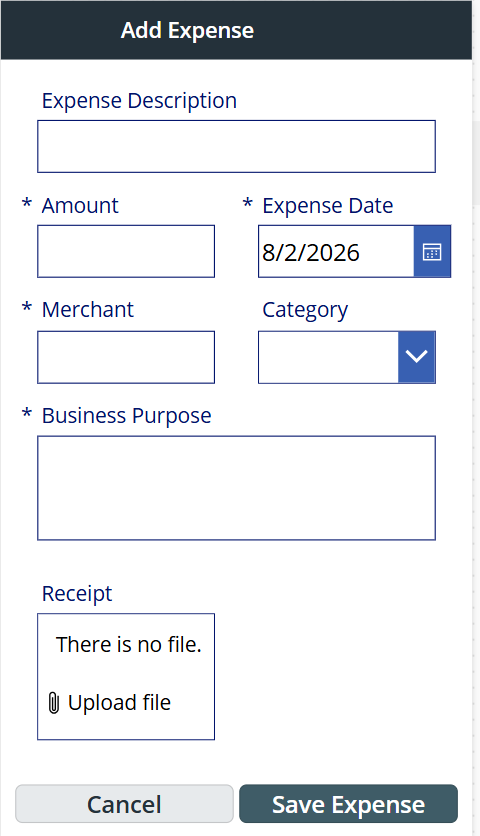
A mobile app built with Power Apps for capturing receipts, documenting business purpose, submitting reports, and managing review decisions.

My roleSolution designer · App builder · Workflow designer

ProblemMissing receipts, incomplete submissions, and unclear review status
SolutionGuided entry, receipt capture, review routing, and visible report status
PlatformPower Apps, Dataverse, and Power Automate
Working portfolio buildActual app screenshots · Sample data
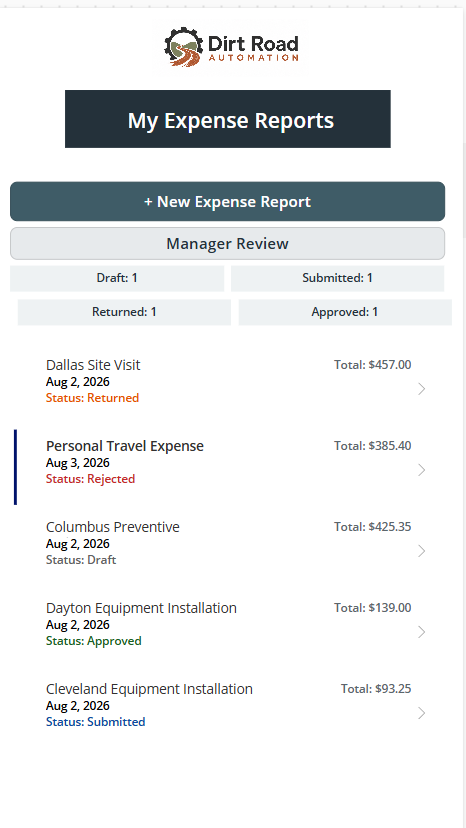
Power Apps expense dashboard with four summary counts and five sample reports, including a rejected reportEnlarge image
Dashboard from Bobbi’s working Power Apps portfolio build. Sample data; four summary counts are shown, while rejected appears in the report list.
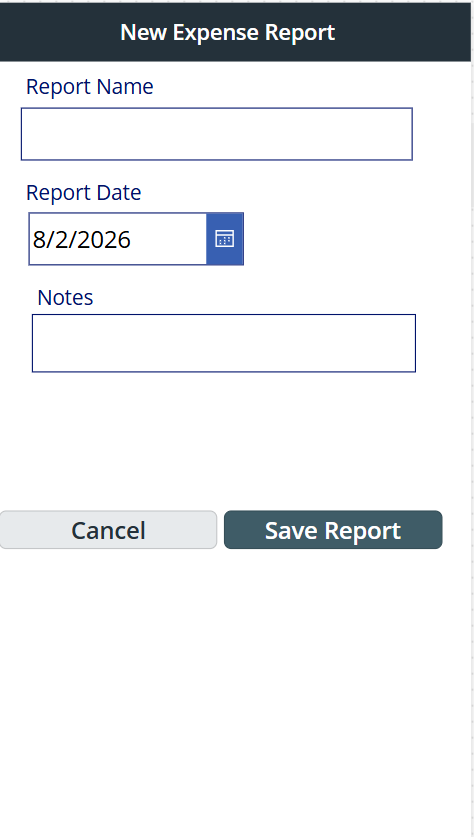
Power Apps report form with name, date, notes, and save and cancel controlsEnlarge image
Report form from the portfolio build: report name, date, and notes.
Power Apps expense line form with amount, date, merchant, category, business purpose, and receipt uploadEnlarge image
Expense line form from the portfolio build: business context and receipt upload.

Expense dashboard

Power Apps expense dashboard with four summary counts and five sample reports, including a rejected report

Dashboard from Bobbi’s working Power Apps portfolio build. Sample data; four summary counts are shown, while rejected appears in the report list.

Open full-resolution image in a new tab
Read the case study

Problem

Field teams need to capture receipts and business context while managers need complete expense reports that are ready to review.

My role

I designed the data model, built the mobile app in Power Apps, and designed the review workflow as a portfolio project.

Solution

Related expense report and expense line tables in Dataverse support report creation, categorized expenses, receipt uploads, status tracking, and manager actions. Managers can approve, reject, or return reports for correction.

Key design decision

Report headers and individual expense lines are stored separately. Required business context, visible status, and a focused manager review queue support complete submissions and corrections.

Outcome

The portfolio build demonstrates receipt capture, report submission, and review states using sample data. It is not presented as a measured production deployment.

Evidence

The images are actual screenshots from Bobbi’s working portfolio app. The dashboard includes four summary counts and a rejected report in the list; it does not show a rejected summary count. The screenshot is preserved as captured, and the source does not establish why that count was omitted.

Additional experience

More ways I connected the work.

01

Fleet Management App

I built an internal application for vehicle assignments, mileage, fuel, preventive maintenance, and project cost allocation.

Production experience · Descriptive case study; original screens not shown

02

Part Number Request Workflow

I structured a multi-page request process with conditional logic, review routing, and automated communication.

Portfolio source description · No production metrics or original screens shown

How I work

Business-first. User-focused. Built for real work.

01

Understand the work

Map the process people actually use, including bottlenecks, exceptions, and decisions.

02

Structure the information

Define data, ownership, statuses, and the information needed to keep work moving.

03

Automate deliberately

Remove repetitive work and add the checks and exception handling the process needs.

04

Make action obvious

Show each user what happened, what matters, and what needs attention next.

About Bobbi

Operations experience with a systems mindset.

I’m Bobbi Gordon, a purchasing and business systems professional based in Pflugerville, Texas. My 20+ years of operations experience spans construction, telecommunications, industrial projects, procurement, manufacturing, and project operations.

I’ve spent my career finding practical ways to make work run better. That led me from improving processes to learning the systems behind them and building solutions myself.

Business methods

Purchasing & vendor coordinationRequirements discoveryProcess mappingData integrity

Power Platform tools

Power AppsPower AutomateSharePointDataverse

Enterprise systems

NetSuiteSalesforce CPQMicrosoft Dynamics

For employers and teams

Need someone who understands the work and can build a practical system?

I’m looking for my next full-time role in purchasing, as a business systems analyst, or as a Power Platform developer. If my background looks like a fit for your team, I’d love to hear from you.

I’m also open to select independent projects when my experience is a good fit.