Bobbi Gordon · Business Systems Analyst · Power Platform Builder

Building clarity where complexity is the norm.

I build practical business systems that make work simpler, clearer, and easier to manage. Dirt Road Automation is my professional portfolio, showcasing Power Platform, automation, analytics, and process improvement projects built from more than 20 years of real-world operations experience.

Microsoft Certified: Power Platform Fundamentals (PL-900)20+ years in operationsPower Apps + Power Automate
01Capture
02Automate
03Clarify
04Act

Messy work in. Clear next steps out.

Built for the places where spreadsheets, inboxes, ERP exports, and real-world operations collide.

Selected projects

Practical automation built around real work.

I start with the work that needs to happen, not the technology.

Power Platform portfolio project

Field Expense Tracker

A mobile-first expense system that gives field teams a faster way to capture receipts, document the business purpose, and submit complete reports.

My roleSolution designer · App builder · Workflow designer

ChallengeLate paperwork, missing receipts, and incomplete submissions
SolutionGuided entry, receipt capture, policy flags, review routing, and status visibility
PlatformPower Apps, Dataverse, and Power Automate
View the full case study

Business problem

Field employees need to document expenses quickly. Managers need complete reports that are ready to review, along with a clear audit trail.

What I built

A phone canvas app backed by related Expense Report and Expense Line tables. It handles receipts, policy flags, status tracking, and manager actions.

Workflow

Employees create a report, add categorized expense lines and receipts, and submit it. Managers can approve, reject, or return it for correction. Automated notifications keep the process moving.

Key design decision

I made a complete submission the easiest path: required business context up front, visible status all the way through, and one focused review queue for managers.

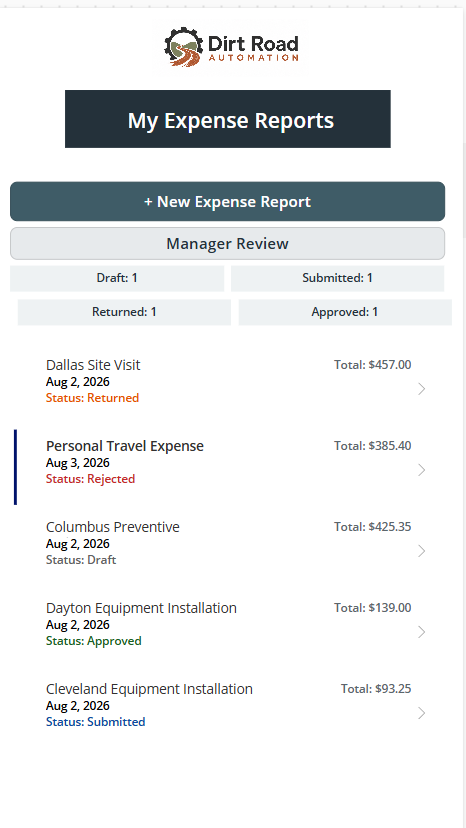
Field Expense Tracker dashboard with branded header, status counts, and five sample reports
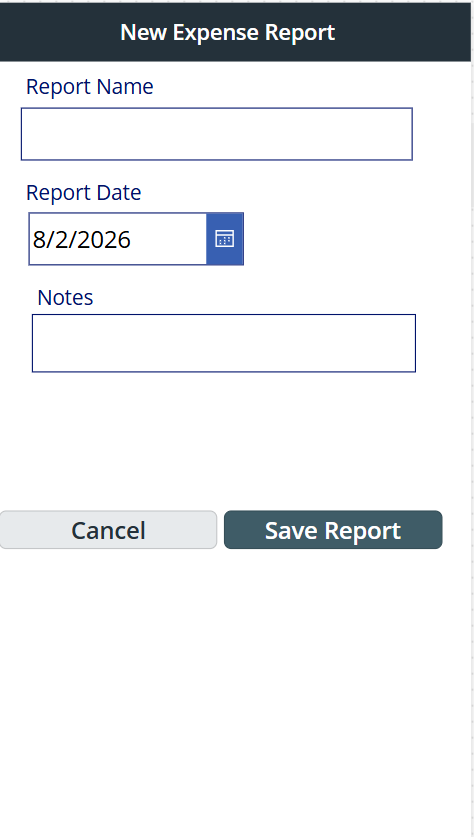
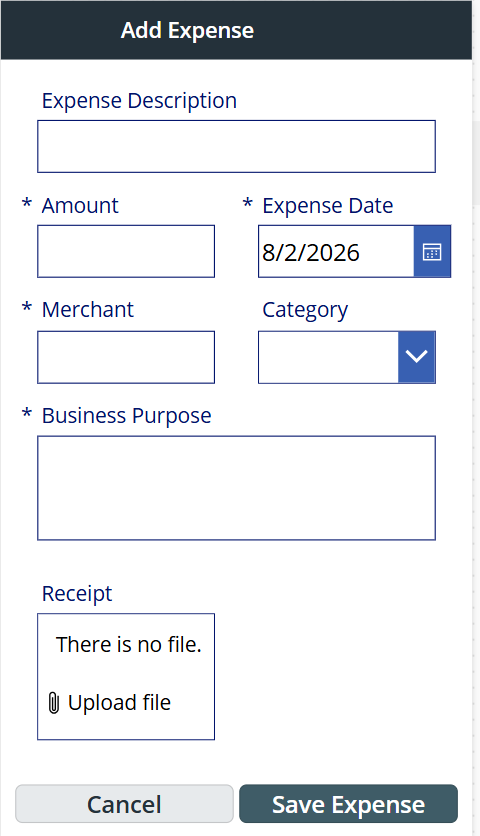
New Expense Report screen with report name, date, notes, and save controlsAdd Expense screen with amount, date, merchant, category, purpose, and receipt upload

Working Power Apps portfolio build · Sample data · Select any screen to enlarge

Sanitized production case study

Procurement Visibility Platform

A three-level operations app that brings sales orders, line details, purchase orders, receiving, tracking, and fulfillment data together so follow-up is faster.

My roleProcess owner · Solution designer · Power Platform builder

ChallengeFragmented reports, hidden exceptions, and repeated status questions
SolutionAutomated intake, deduplication, status logic, alerts, and drill-down views
ScaleApproximately 500 purchase orders per month and thousands of operational records
PlatformNetSuite, SharePoint, Power Apps, and Power Automate
View the full case study

Business problem

Sales order, PO, shipment, receiving, and exception data was scattered across ERP exports, spreadsheets, PDFs, inboxes, and individual follow-up.

What I built

Scheduled report intake turns NetSuite exports into structured SharePoint data. A searchable Power Apps app then shows sales order, line item, and purchase order details.

Controls and logic

Unique keys prevent duplicate records. Status buckets, confirmation guardrails, tracking updates, and exception views show what is missing and who needs to act.

Operational outcome

Project managers can answer routine material status questions without digging through files or repeatedly asking Purchasing. Exceptions stay visible so they can be followed up on.

Sanitized interface reconstruction · No confidential production data

Additional experience

More places where I turned a messy process into a usable tool.

01

OSHA Inspection App

Mobile inspection capture with automated HTML/PDF generation, email delivery, and SharePoint filing.

02

Fleet Management App

One place to manage vehicle assignments, mileage, fuel, preventive maintenance, and project cost allocation.

03

Part Number Request

A structured, multi-page request process with conditional logic, review routing, and automated communication.

How I work

Business-first. User-focused. Built to hold up in the real world.

01

Understand the work

Map the process people actually use, including the bottlenecks, exceptions, and decisions. The official procedure rarely tells the whole story.

02

Structure the information

Define the data, ownership, status logic, and minimum information needed to keep the work moving.

03

Automate deliberately

Remove repetitive work, then add the safeguards, exception handling, and visibility the process needs.

04

Make action obvious

Give each user a clear view of what happened, what matters, and what needs attention next.

About Bobbi

Operations experience with a systems mindset.

I’m Bobbi Gordon, a business systems and operations professional with more than 20 years of experience across construction, telecommunications, industrial projects, procurement, manufacturing, and project operations. I’ve spent most of my career finding practical ways to make work run better. That led me from improving processes to learning the systems behind them to building the solutions myself. I bring that mix of hands-on operations experience and technical problem-solving to every project.

Requirements discoveryProcess mappingPower AppsPower AutomateSharePointDataverseNetSuiteSalesforce CPQMicrosoft DynamicsData integrity

For employers and teams

Need someone who can understand the work and build a practical system?

I’m looking for my next full-time role in Business Systems, Power Platform, automation, or process improvement. If my background looks like a fit for your team, I’d love to hear from you.

I’m also open to select independent projects when my experience is a good fit.